deTube
Professional Video WordPress Theme by DeDePress
deTube is a Professional WordPress Theme designed for Video Websites, and News/Magazine sites. This theme will help you get a professional video/news site up and running quickly, it is inspired by the popular websites: YouTube, Vimeo and Dribbble. No modest to say that it is the most powerful video news WordPress theme so far.
- Current Version: 1.4.6
- By: dedepress.com
- Email: dedepress@gmail.com
First Things First
Firstly, a huge thanks for purchasing this theme, your support is truly appreciated! This document covers the installation and use of this theme and often reveals answers to common problems and issues. I encourage you to read this document thoroughly if you are experiencing any difficulties. If you have any questions that are beyond the scope of this document, feel free to hit us.
Installing Theme
You can install the theme by 2 different ways, they both are very easy and it only depends on which method you want to try to install it.
Installing Theme via WordPress
You can install theme directly to your site by using the Add New Themes option in the Appearance sub-menu.
- Navigate to "Appearance -> Themes" and switch to tab "Install Themes -> Upload".
- Click the "Choose File" button and choose "detube.zip" file (in "/detube-package/themes/" directory).
- Click the "Install Now" button and wait a few seconds till WordPress does its job.
- Click "Activate" link after theme installed successfully.
Installing Theme via FTP
To add a new Theme to your WordPress installation manually via FTP, follow these steps:
- Using an FTP client to access your host web server.
- Upload 'detube' folder( in "/detube-package/themes/" directory) to '/wp-content/themes/' directory, and the result structure looks like "/wp-content/themes/detube/".
- Go to "WP Admin > Apperance" page, Activate deTube theme.
Install Plugins
As of 1.3.7, there is no plugins in theme package, instead, we listed require or recommend plugins on "Appearance -> Install Plugins" page.
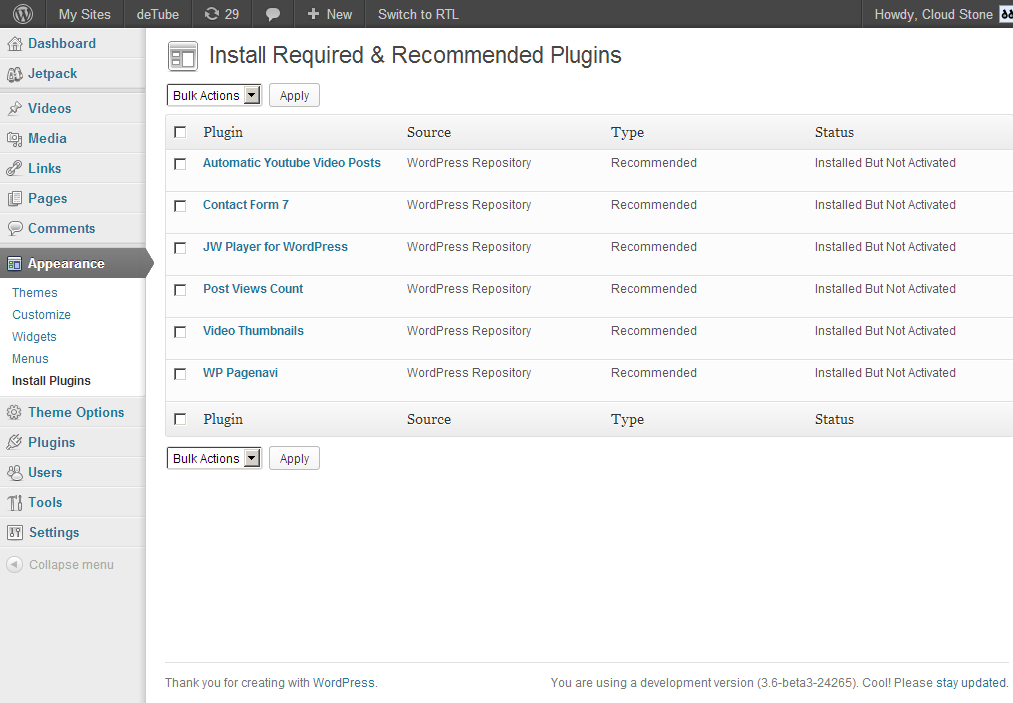
- Required: if a pluing has type "Required", you MUST install and activate it.
- Recommend: if a plugin has type "Recommened", it means that you can use it or not depends on what features you want to have.
Note: To makes views count function work, you need to install and activate "Post Views Count" plugin or "WP Postviews" plugin, we recommend Post Views Count.
Upgrading Theme
BACKUP YOUR DATABASE. IT'S VERY IMPORTANT. We are very careful to avoid occurred errors, but just in case, you should always backup your dababase before you're ready to installing or upgrading themes and plugins.
There are also two ways to upgrade the themes.
Upgrading Theme via FTP
it's very easy, just do it like Installing Theme and override the older.Upgrading Theme via WordPress
- Go to "Appearance > Themes" and temporarily activate a different theme (theme can not be deleted if it is active).
- Now click on the "Delete" button to delete the theme.
- click on the "Upload" link, upload the latest theme zip and activate it (see tutorial on Installing Themes)
Upgrading instructions
Before you're going to upgrade theme, please follow the instructions that match your situation.Upgrading to 1.3.7 or higher
To upgrade to deTube 1.3.7, if you have buddypress installed:
- First, please update your BuddyPress to 1.7 or higher.
- Method 1: The easiest way is deactivate and delete older deTube theme, then re-install the new version.
- Method 2: If reinstalling does not suit you such as you modified the theme, so you need to delete your old buddypress templates from the theme folder, the related folders and files you need to delete:
- Folders: "bp/", "members/", "activity/", "forums/", "groups/" and "registration/".
- Files: bp-functions.php
Delete the older "Video Thumbnails for deTube" plugin and use official "Video Thumbnails" plugin.
Upgrading to 1.3.6
Due to some users reported WP Postviews plugin have CPU overload problem and some hostings are not allowed to use it, we made the theme ALSO compatible with another views plugin - Post Views Count since 1.3.6. there is something you may would like to know:
- The Post Views Count plugin support views in days, weeks, months and years.
- If you switch the plugin from WP Postviews to Post Views Count, the views will not lost.
- If you switch the plugin from WP Postviews to Post Views Count, just deactivate WP Postviews and activate Post Views Count, DO NOT click ¡°UNINSTALL WP-PostViews¡± button, otherwise your views will be lost and back to zero.
- The WP Postviews plugin can still work with our theme, you can use one of them.
Setting up 'Home' and 'Browse' Page
- Create a new page, eg. 'Home', set page template as 'Home', and publish it.
- Create a new page, eg. 'Browse', don't need to do anything, just publish it.
- Go to Settings > Reading, Select "A static page" radio button, select 'Home' page as front page and 'Browse' page as posts page.

Set page template 'Home' for your home page

Front page displays in Settings > Reading
Configure Plugins
This theme comes with three plugins, you just need to activate them and the theme will work well. but if you want to configure them, you can found them under Settings page:
- Settings > Video Thumbnail
- Settings > PageNavi
- Settings > PostViews
Configure Theme Options
- Go to 'Theme Options > General' and configure General Settings
- Go to 'Theme Options > Home' and configure Home Settings
- How to configure these options? Just follow the description of each settings section and each options, it's very easy.
Configure Home Page
To configure the home page, Go to Theme Options > Home.
Home Featured Settings: Enable you to show featured posts on home page with ajax and carousel effect. If you don't want to show it, set 'Number of Posts' to 0.
Home Sections Settings: Enable you to add UNLIMITED section boxes to home page, and drag section boxes to change their order. For each section box, you can configure the post query arguments, title, link, and layout view etc. You can also insert custom content before/after this box, such as your advertising code.

Home Settings and Front Displays
since version 1.1, you can select a layout for the home featured content area.

Home Featured Content Layout Settings on Theme Options page
Configure Archive Pages
To configure the archive pages, Go to Theme Options > General.
Archive Page Settings: These settings determine how to display content on archive pages..
Category Featured Settings: These settings enable you to show posts of current category with carousel effect on category pages. If you don't want to show it, set 'Number of Posts' to 0.

Home Settings and Front Displays
Configure Single Post Pages
Since 1.1, you can select different layout for your single post pages, to set up a general layout, go to Theme Options > General > Single Post Pages Settings
:
General Single Video Layout Settings on Theme Options page
You can override this setting for individual posts in "Video Settings" panel on edit post pages.

Select 'Video Layout' and 'Post Format' on Add/Edit post pages

Different Layout displayed on front
Configure Footer Settings
To configure the footer, Go to Theme Options > Footer Settings.

Footer Settings on Theme Options

Footer appear in front
Custom Labels for 'post' post type
If you want to change the labels of WordPress built-in post type 'post', to 'Videos', or whatever you want to name it, go to "Theme Options > Custom Labels Settings" and enter your custom labels.

Custom Labels Settings on Theme Options
Hook Settings / Custom Code Settings
To configure the hook settings, Go to Theme Options > General > Hook Settings.
Head Code: Paste any code here. It will be inserted before the </head> tag of your theme.
Footer Code: Paste any code here, e.g. your Google Analytics tracking code. It will be inserted before the </body> tag of your theme.
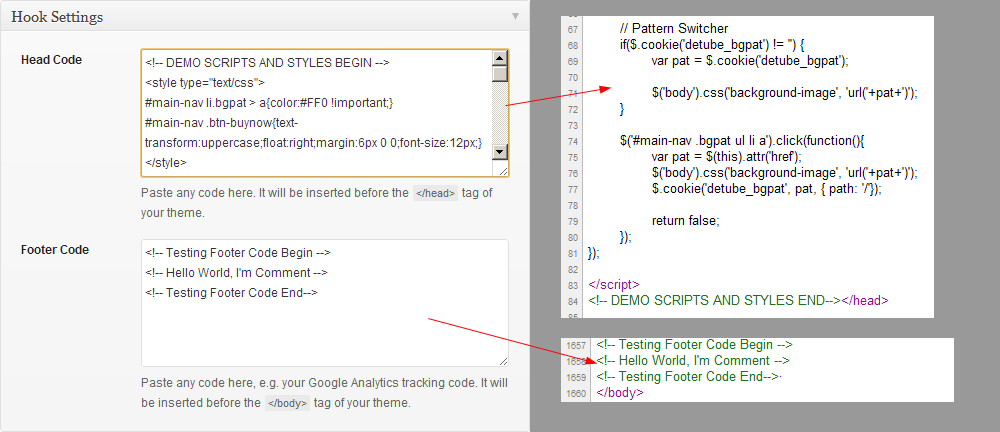
Custom Codes into head and footer
Configure More Settings in Theme Options
There are more settings in theme options, please configure them with the description of settings section.
Post Like Settings: You can configure like feature here.
Single Video Pages Settings: You can configure related videos here.
Design Settings: You can configure background pattern here.
Adding/Edit Video
To adding or edit a video, you need to configure Video Settings. You can embed the video into your post by the one of the following methods:
1. Video File
Use this method if you want to embed self hosted video:
Paste your video file url to textarea. Supported Video Formats: mp4, m4v, webmv, webm, ogv and flv.About Cross-platform and Cross-browser Support
If you want your video works in all platforms and browsers(HTML5 and Flash), you should provide various video formats for same video, if the video files are ready, enter one url per line. For Example:
http://yousite.com/sample-video.m4v
http://yousite.com/sample-video.ogv
Recommended Format Solution: webmv + m4v + ogv.
Video Poster: If your post has featured image, the theme will use it as video poster by default. But if you want to use custom video poster instead of feature image, enter your poster image url to "Video Poster" field.
2. Video URL
You can embed video from popular video sites like YouTube or Vimeo, just enter the video url to "Video URL" field. For example:
http://www.youtube.com/watch?v=nTDNLUzjkpg
or
http://vimeo.com/23079092
Note: To use this methods, you must enable built-in "Auto-Embeds" feature, go to "Settings > Media", make sure the "auto embeds" option is checked.
3. Video Code
Paste the raw video code to "Video Code" textarea, such as <object>, <embed> or <iframe> code
Note: You need only the one of methods, the video is determined in the order: Video Code > Video URL > Video File.

Video Settings on Add New/ Edit Pages
Custom Page Templates
This theme come with several page templates: Archives, Full Width and Tag Cloud. To adding a page with the one of the page template:
- Create a new page
- Select a page template from "Page Attribute" panel.
- Publish it
- Download and install contact form 7 plugin
- Generate the contact form 7 shortcode via the Contact settings page of Contact form 7.
- Create a new page
- Paste the shortcode you just generated into content editor, and publish page.
Custom Menus
To create a custom menu:
- Go to Appearance > Menu
- Click on the plus (+) sign to create a new menu (eg. Main Menu).
- Add the menu items from the left panels (Custom Links, Pages, or Categories)
- To create dropdown menu, drag the menu item toward the right (the item(s) will be indented)
- When you are done adding the menu items, click "Save Menu"
- Then on the top left panel where it says 'Theme Locations', select the menu from the dropdown to assign it to the navigation location and click "Save"
- Note 1: If you don't see your custom post types or taxonomies, look under the Screen Options to make sure they are checked to be Show on Screen.
- Note 2: the custom menu can also be used with the widget (go to Appearance > Widgets and drop in the Custom Menu widget)

Custom Menus on admin
Custom Widgets
The widgets are available at Appearance > Widgets. The big panel on the left side shows all available widgets. The small panels on the right are the widgetized areas.
To add a widget: drag and drop the widget from the left panel to the right panel.
To remove the widget: drag the widget back to the left panel (Available Widgets panel). If you want to keep the widget setting for future use, drag it to the Inactive Widgets instead of the Available Widgets panel. It will save your widget settings. To retrieve the widget, drag the widget from Inactive Widgets panel instead of the Available Widgets panel.
This theme included 11 Sidebars for displayed on different types of pages:
6 Context Sidebars
- Home Sidebar: will displayed on homepage
- Category Sidebar: will displayed on category archive pages
- Single Video Sidebar: will displayed on single video pages
- Page Sidebar: will displayed on all WordPress construct of pages
- Author Sidebar: will displayed on author archive pages
- Main Sidebar: This is the most generic sidebar, If a page does not specify the sidebar, or specify the sidebar but the specified sidebar is empty, this sidebar will be used.
5 Footbars
5 Optional Footer Widget Areas for your site footer: Footbar 1, Footbar 2, Footbar 3, Footbar 4 and Footbar 5.

Custom Widgets on Apperance > Widgets
Custom Files
If you want to add custom PHP/JS/CSS code, you can write your code into the custom files, so the theme update will does not overwrite your changes, this theme come pack with 3 files for custom work by theme user:
detube/custom/custom.css
detube/custom/custom.js
detube/custom/custom/php
NOTE: Thess files only work if they are in the theme root directory, so you should move it from "custom" folder to theme root "detube" folder.
Buddypress Compatible
To make this theme compatible with Buddypress, simply install and activate BuddyPress.
JWPlayer Integration
This theme used jPlayer as default player, If you want to use JWPlayer, following these steps:
1. Download JW Player for WordPress plugin, install and activate it.
2. For more detailed instructions please visit: Getting Started with the WordPress Plugin for the JW Player
3. Paste JWPlayer shortcode into the "Video Code" field on "Add New Post" or "Edit Post" page. For Example:
[jwplayer file="http://www.youtube.com/watch?v=7W194GQ6fHI"]
Translation
We provide translation files for you to translate the theme into your language. The translation files default.mo and default.po are located in the languages folder inside your package.
To translate the theme into your language, follow the steps below:
- Edit the .po file using POEdit (you can also use qTranslate or WPML plugin)
- Use the translation field to make replacements
- From the file menu, save file with your language name it, for example: de_DE.po. It will generate both a .po and .mo file for your translation. Note: Make sure the language files you generated are in the languages/ folder/.
- Next edit wp-config.php located in the root folder of wordpress and define the WPLANG prefix with your language name which should be similar to the translation file name.
- You're done!
Custom Files
The theme come with three files(custom.css, custom.js and custom.php) for who to customize the theme, they are located in the custom folder.
To use them, just move them to theme root directory and write your own code.
Support
If you have any further questions or need support, please do not hesitate to contact us via one of the following ways:
- Simply post your question in theme comments on item page.
- Submit your issue via message form on our profile page while logged in.
- Send us an email here: dedepress (at) gmail (dot) com
- Hit us up on Twitter: @dedepress
Changelog
= 1.4.6 - 2013.08.22
 * Fixed the wrapper problem with latest WooCommerce.
 * Added WooCommerce Sidebar.
 * Added ellipsis to entry-title in grid view.

= 1.4 - 2013.08.14
 * Compatible with WordPress 3.6
 * Added jplayer shortcode [jplayer src="" poster=""].
 * Added support for WordPress built-in MediaElement Player and FlowPlayer plugin
 * Supported Player so far: MediaElement, FlowPlayer, JWPlayer and jPlayer
 * Added default player support, now you can choose one of supported player as your default player for self hosted videos.
 * Added New Latest Tweets Widget based on Twitter API 1.1
 * Added Footbar Layout Option
 * Reused jQuery masonry instead of CSS3 Multi Columns because it caused too many problems.
 * Make header buttons to optional.
 * Added initial-scale and maximun-scale for viewport, looks better on iPad landscaple.
 * No longer using Google hosted jQuery, beacause it may conflicting with some plugins.
 * Updated jPlayer to 2.4.0
 * Fixed bug: the videos imported from Automatic Youtube Videos Plugin can't play in home featured area
 * Completely rewritten for more organized code, and easier maintenance
 * Minor bug fixes

= 1.3.7 - 2013.05.21
 * Removed all plugins from theme package, instead, we listed require and recommend plugins on "Appearance -> Install" page.
 * Make it compatible with Automatic Youtube Video Post plugin.
 * Removed BuddyPress sepecific templates because we don't need theme since BuddyPress 1.7.
 * Added bbPress Sidebar if the plugin is activated on a site.
 * Fixed that Youtube video with JWPlayer can't play on mobile devices.
 * Fixed the protocol bug that it casued external scripts aren't able to work when a site running on https:// mode.
 * Fixed invalid post number option on category pages.
 * Included class-tgm-plugin-activation.php file to list require and recommend plugins on WordPress admin.
 * Added plugin-compat.php file to palces all of functions related to plugin compatibility.
 * Minor bug fixes

= 1.3.6 - 2013.05.01
 * Update jPlayer plugin to 2.3.0 (it support real full screen now)
 * Added, make it compatible with Post Views Count plugin.
 * Autoscroll work with cirular scroll.
 * Added views option to related posts
 * Minor bug fixes

= 1.3.5 - 2013.03.25
 * Fixed the thumb overlay problem on Safari
 * Fixed the post order by specified ids on home page settings.
 * Fixed the bugs by 1.3.4

= 1.3.4 - 2013.03.22
 * Make it support latest JWPlayer WordPress Plugin (Support for JWPlayer 6)
 * Added 'post format' option to home page settings.
 * Fixed image issue with facebook graph tags.
 * Fixed small bugs  by 1.3.3.


= 1.3.3 - 2013.03.17
 * Removed SlidesJS plugin, in favor of jCarousel.
 * Make home featured(Standard layout) to autoscroll.
 * updated jQuery to 1.8.3
 * updated jPlayer to 2.2.0
 * Added full page background image and make background repeat and background attachment to options.
 * Added sort type "random".
 * Make Facebook Open Graph Tags to optiontal.
 * Make it compatible with the WooCommerce plugin.
 * Minor bug fixes

= 1.3.2 - 2013.02.07
 * Added Boxed Layout.
 * Improved thumbnail sizes with different views.
 * Improved related posts.
 * Make dropdown menu working on iPad.
 * Removed JS Masonry Layout, used CSS3 Multi Columns.
 * Fixed Posts Widget bug on "Archives" page.

= 1.3.1 - 2013.01.17
 * Just fixed the jQuery version problem

= 1.3 - 2012.09.19
 * Compatible with BuddyPress.
 * Compatible with JW Player WordPress Plugin.
 * Added custom files for theme users to custom coding.
 * Excluded sticky posts from related posts.
 * Fixed video thumbnail error when share post to facebook.
 * Fixed wrong thumbnail size in list-large view.
 * Fixed login url bug.
 * Minor bug fixes.

= 1.2.5 - 2012.08.26
 * Added Related Posts Widget.
 * Fixed connection error when install plugins or themes.
 * Improved image size in responsive.
 * Fixed some bugs in IE9.
 * Added post type option to home featured content settings and home section box settings.
 * Make autoplay to optional on home featured content area.
 * Remove top info bar and Youtube Logo from Youtube video player.
 * Fixed translation error.
 * Minor bug fixes.

= 1.2.4 - 2012.08.16
 * Fixed z-index bug that the dropdown menu appears behind the video screen.

= 1.2.3 - 2012.08.14
 * Added Full Screen for jPlayer
 * Added manual excerpt support
 * Added Facebook open graph tags support and fixed incorrect thumbnail when like/share post to facebook
 * Updated AddThis, it could configure PubID to track analytics.
 * Updated autoplay to optional
 * Fixed initial like count

= 1.2.2 - 2012.08.01
 * Minor bug fixes

= 1.2.1 - 2012.08.01
 * Make responsive to optional
 * Fixed the "Like" feature again
 * Minor bug fixes

= 1.2 - 2012.07.28
 * Responsive now
 * Fixed the "Like" feature
 * Minor bug fixes

= 1.1 - 2012.07.23
 * Added regular posts support, so this theme could also be used for news/magazine sites now.
 * Added post format support: 'standard' and 'video'.
 * Added single video post layout: Standard and Full Width
 * Added home featured content layout: Standard and Full Width
 * Added custom page templates: Full Width, Tag Cloud and Archives.
 * Added option 'custom background color' and updated option 'background pattern' to optional
 * Updated "More/Less" toggle to optional
 * Updated Widgets: "Single Video Stats" to "Single Post Stats", "Videos Widget" to "Posts Widget"
 * Updated "Custom Post Labels" to optional by one-click check box.
 * Removed the title, byline, portrait on vimeo video
 * Disabled suggested videos on YouTube video when the video finishes
 * Updated "Auto Video Thumbnail", use HD thumbnails from YouTube and Vimeo when they're available.

= 1.0 - 2012.07.16
 * Init release.